

SMART FINANCIAL MANAGEMENT: GUIDE TO SETTING UP BALANCE ALERTS ON BIDV SMARTBANKING
In the digital age, controlling your cash flow not only helps you manage your spending effectively but also acts as a "shield" to protect your bank account. To provide maximum support to customers, BIDV has integrated the "Balance Alert" feature directly into the SmartBanking app with flexible options.
Below is a detailed guide to help you master this feature in just a few "taps."
1. Why should you set up Balance Change notifications?
Instead of manually checking transaction history, this feature offers significant advantages:
- Instant: Receive notifications immediately when funds are deposited or withdrawn.
- Diverse: Choose to receive notifications via the App (free), traditional SMS (paid), or experience the unique SmartVoice OTT technology.
- Smart sharing: Share balance changes with family or partners for convenience in business and daily life.
2. Step-by-step installation and registration guide
To get started, log in to the BIDV SmartBanking app and follow these steps:
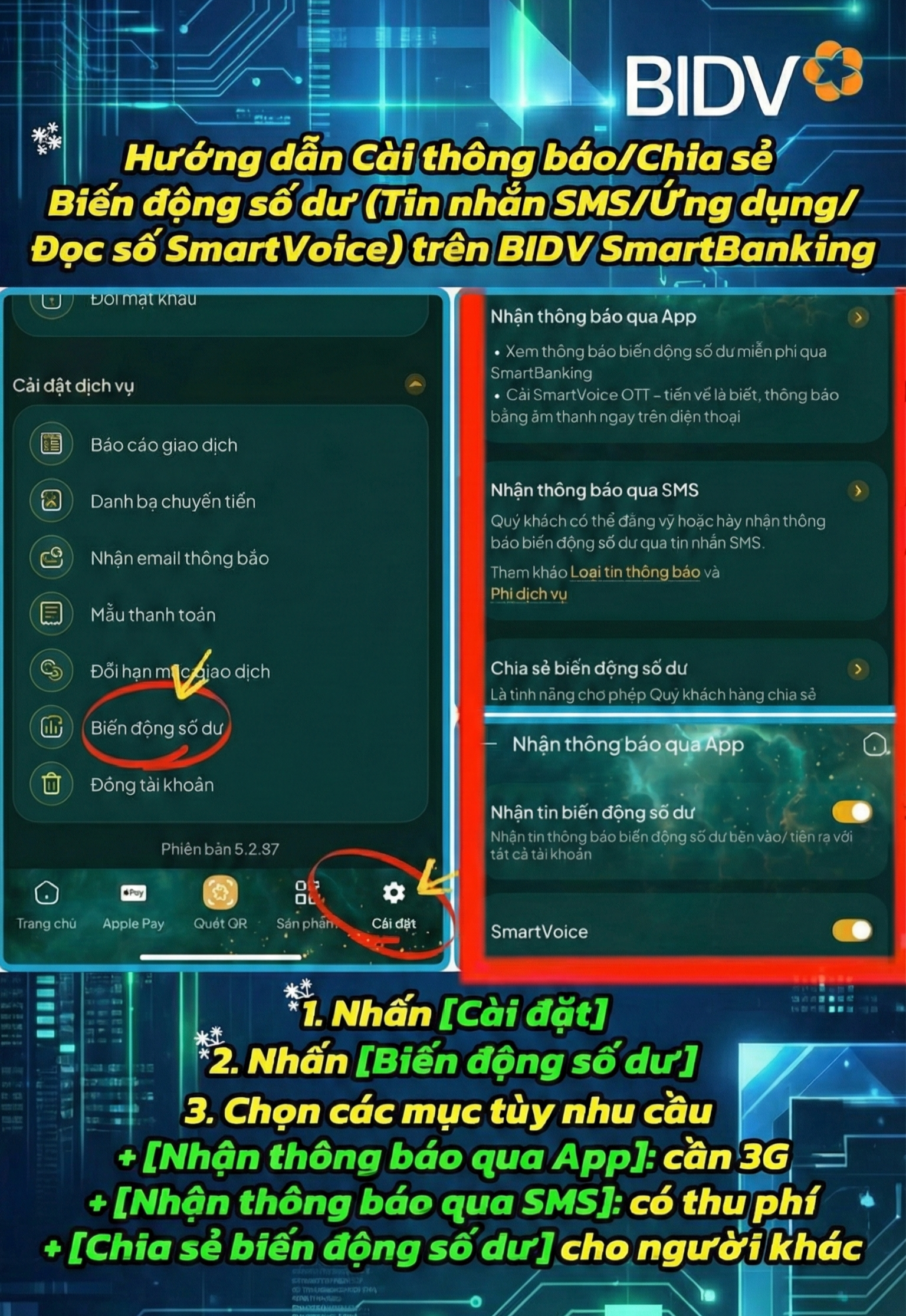
Step 1: On the app's main interface, select the Settings icon (gear symbol) on the navigation bar at the bottom of the screen.
Step 2: In the Service Settings menu, scroll down and select Balance Changes.
Step 3: Customize according to your personal needs Here, the system provides 3 main options for you to set up:
- Receive notifications via the App: This is a completely free method. You only need to ensure your phone has an internet connection (Wifi/3G/4G) to receive instant push notifications.
- Receive notifications via SMS: Traditional BSMS text message notification service (subject to current fees). This method is suitable when you do not frequently turn on your internet connection.
- Share balance changes: A special feature that allows you to share transaction information with others (such as accountants, employees, relatives, etc.) in a secure and proactive manner. This feature is extremely popular and is currently free for the first 2 phone numbers on the sharing list, after which there is a fee of 5,000 VND/phone number/month.
Step 4: Activate the auxiliary feature (SmartVoice OTT) If you want to experience new technology, slide the activation bar in the SmartVoice OTT section. The app will "read" your balance notifications aloud on your phone, allowing you to grasp the information without looking at the screen. This feature is currently free and reads notifications shared by others as well.
A note from BIDV:
- When setting up notifications via the App, grant notification permissions to the app in your phone's settings and ensure your phone is not in power-saving mode/airplane mode/restricted background app mode...
- SMS services are charged monthly, while app notifications are completely free, helping you save on account management costs.
With these simple steps, you can now feel completely secure and in control of all your financial transactions with BIDV SmartBanking. Install today to experience the new generation of digital banking services!
Contact information:
- Hotline: 1900 9247
- Website: http://bidv.com.vn